Sorted by aisle as you type
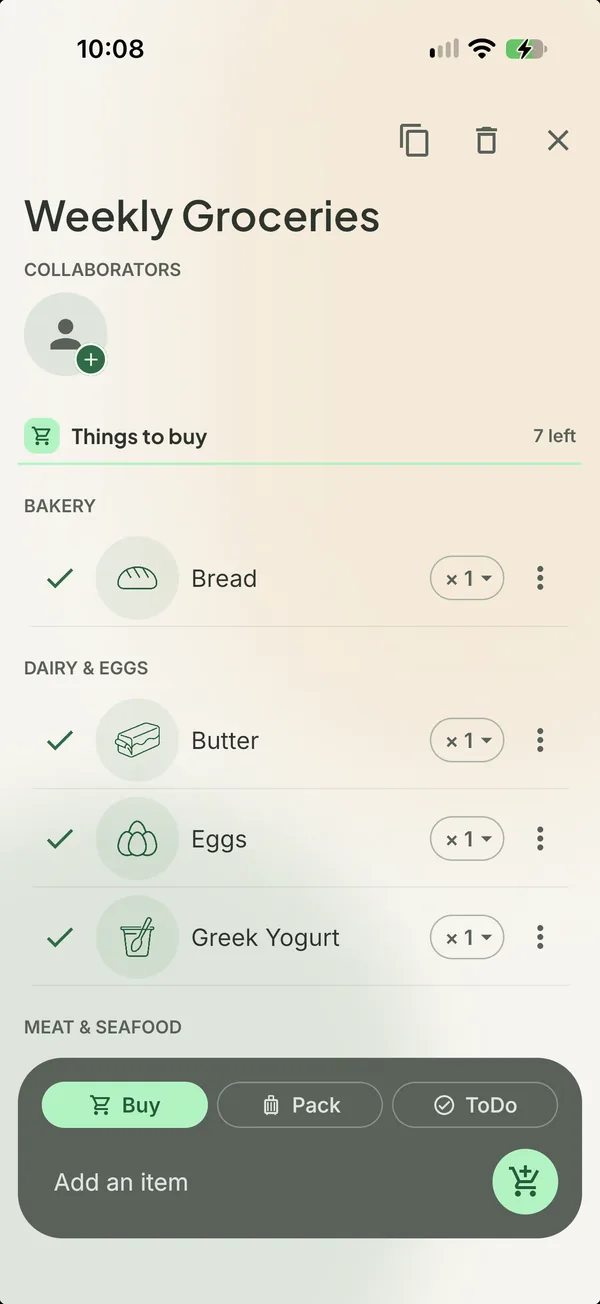
Type milk, tortillas, avocados and dish soap. By the time you look up, they are under Dairy and eggs, Bakery, Produce and Household, each with a small drawn icon.
Nothing to pick, nothing to drag. The list is already in the order you will walk the store.


Free on iPhone and Android.

How it works
- 1
Twenty store sections
Produce, Bakery, Dairy and eggs, Meat and seafood, Pantry, Frozen, Household and the rest. Every grocery item has a home.
- 2
Fix it once
Move an item to a different section and Sorted remembers your choice for next time.
- 3
An icon for everything
Every list and every item gets its own line icon, so a glance in the aisle is enough.
- 4
Suggestions as you type
Things you have bought before appear while you type, so the weekly shop takes seconds to write.
Good to know. Sorting and icons are free on every list. Suggestions from your own history are part of Premium.
Questions about sorted by aisle
- What if an item goes in the wrong section?
- Move it. Sorted keeps your correction and uses it the next time you add that item.
- Does sorting work for things that are not groceries?
- Items to pack or to do keep their own piles. Sorting into store sections applies to things you buy.
Goes with
Get Sorted on your phone
Make a list, add three things, invite whoever shops with you.
Free on iPhone and Android.