Recipes from what you bought
You bought chicken, rice, ginger and scallions. Sorted suggests what they could be tonight, with a photo and the steps, before you have opened the fridge.
Every shop adds to a cookbook made of your own trips. Pick a recipe and its ingredients become a list, ready for next time.


Free on iPhone and Android.
How it works
- 1
Ideas after every shop
Tick the last item bought and new recipes appear in Ideas, built from that trip.
- 2
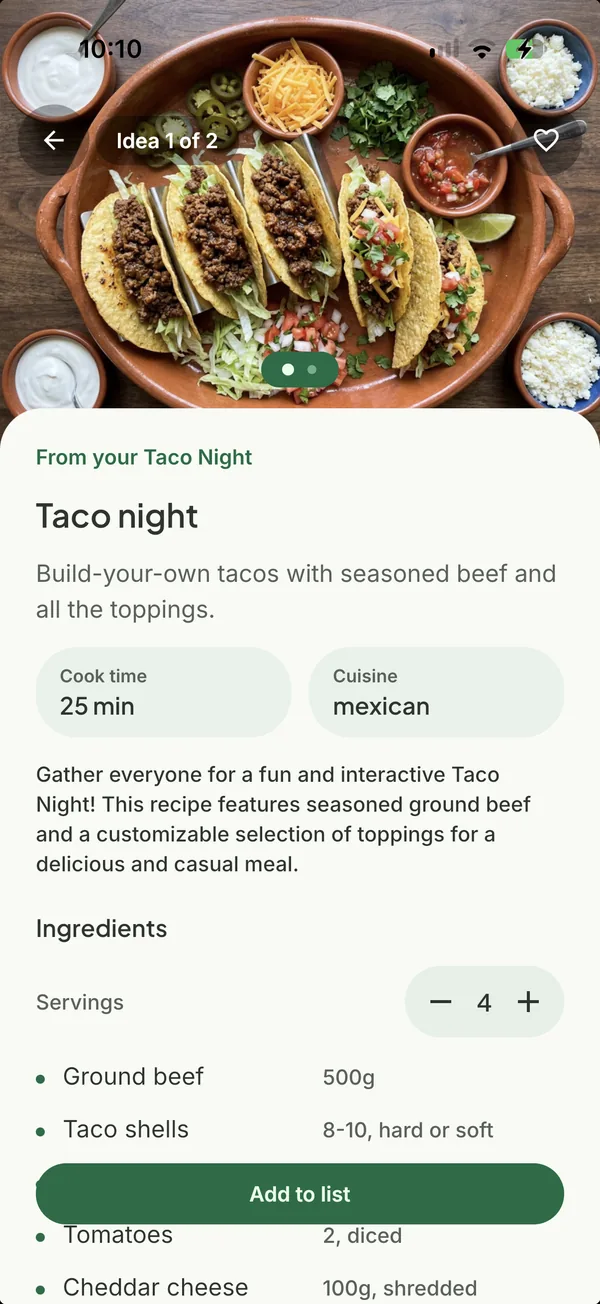
Photo, ingredients, steps
Each recipe opens with a picture, what it needs and how to make it, large enough to read while cooking.
- 3
Back into a list
One tap adds a recipe's ingredients to a list, already sorted by aisle.
- 4
Tonight on the home screen
The widget offers tonight's recipe without opening the app.
Good to know. Recipe ideas are part of Sorted Premium. The Ideas tab can be hidden from Profile if you never want it.
Questions about recipe ideas
- Where do the recipes come from?
- They are generated from the items you bought on a trip. Allergies and dietary needs are yours to check; Sorted does not know them.
- Can I cook from the recipe in the app?
- Yes. The recipe page shows the ingredients and the steps in order.
Goes with
Get Sorted on your phone
Make a list, add three things, invite whoever shops with you.
Free on iPhone and Android.