One shared list, live on every phone
Somebody says we are out of milk. It goes on the list from the couch. Whoever is at the store sees it before they reach the dairy aisle. That is the whole idea.
A Sorted list belongs to everyone on it. Each person adds from their own phone, ticks things off as they shop, and sees what the others have done without a single message.


Free on iPhone and Android.

How it works
- 1
A QR code or a link
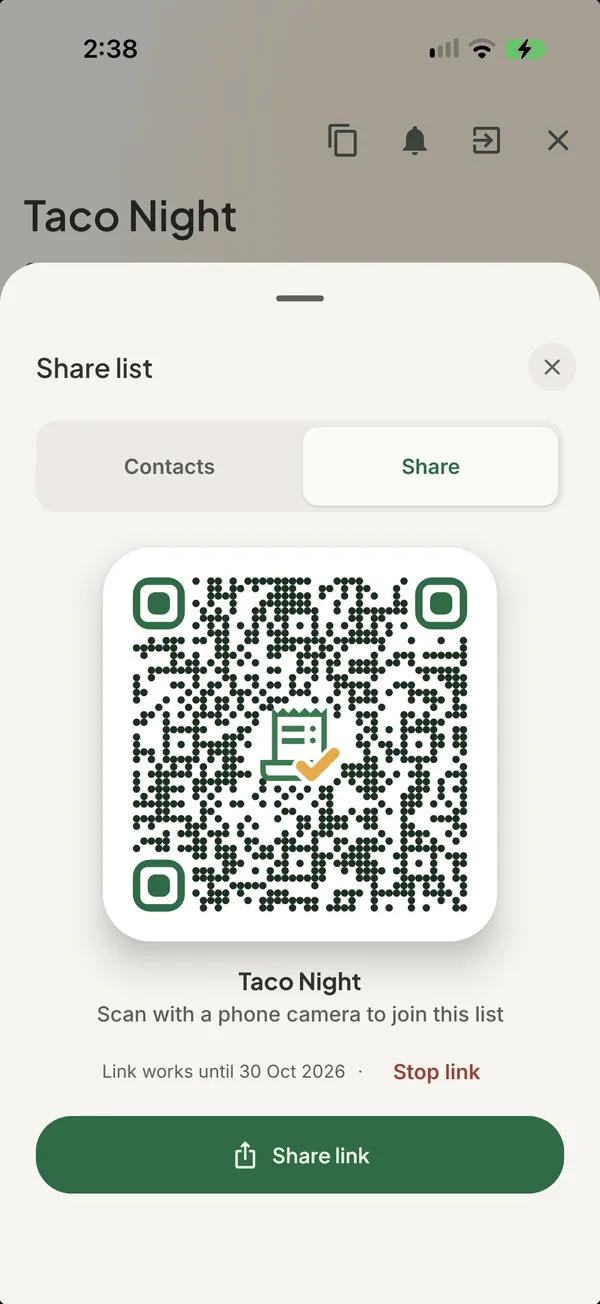
Show the QR code to someone next to you, or send the link through any messaging app. One tap and they are in.
- 2
Every change, as it happens
Add, edit or tick an item and it shows up on every member's phone within moments, with the name of who did it.
- 3
Contacts you reuse
People you have shared with before are one tap away the next time, on any list.
- 4
Leave cleanly
A member can leave a list at any time. The owner can remove members, or delete the list for everyone.
Good to know. Sharing is free. Premium features on a shared list, like recipe ideas and running low alerts, cover you and one other person on your subscription.
Questions about shared lists
- Do the people I share with need Sorted?
- Yes. They install Sorted, sign in, then open your link or scan your QR code to join.
- Can I see who added or bought something?
- Yes. Each item shows who added it, and ticking it bought is visible to everyone on the list.
- How many people can be on a list?
- As many as you invite. Premium benefits on a shared list cover the subscriber and one other member.
Goes with
- Sorted by aisleItems land in their store section as you type, each with its own drawn icon.Read more
- Buy, pack and doGroceries, a trip, a party or a move. Every item is something to buy, pack or do.Read more
- Home screen widgetInvites, what is running low and tonight's recipe, without opening the app.Read more
Get Sorted on your phone
Make a list, add three things, invite whoever shops with you.
Free on iPhone and Android.